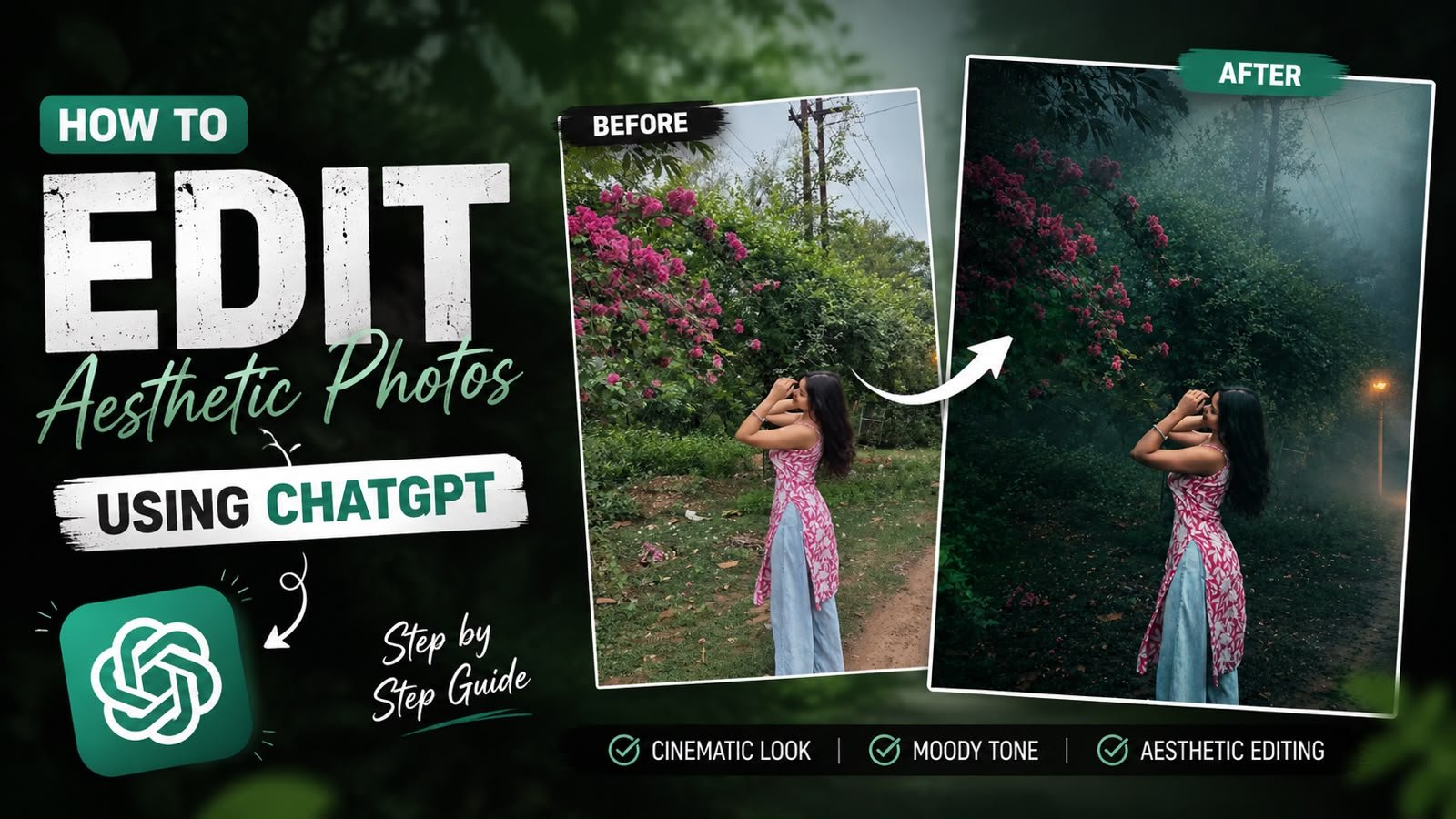
ChatGPT can help plan a visual style, but it does not replace the camera, editor, or image generator. Its useful role is translating a vague mood into a colour palette, shot list, lighting description, crop, background, and reusable prompt structure.
Begin with the platform and purpose. A vertical Reel cover, an Instagram feed portrait, and a product photo need different framing and detail. Also decide whether the final result will be a real photograph, a lightly edited photo, or a fully generated image before writing the prompt.
When a real person’s photo is used, protect the original file and review every output carefully. AI tools can alter facial details, hands, clothing, text, and background objects even when a prompt asks them not to. Avoid uploading private or sensitive portraits to a service unless its privacy terms are acceptable.
This guide covers a practical brief, prompt structure, real-camera and generative workflows, consistency checks, and common limitations. The aim is a repeatable process that produces usable visuals—not an unsupported promise that one prompt will deliver a perfect result.
Copy-Ready Prompts
Use the prompts below in ChatGPT, Gemini, or another AI assistant. On your published site, each prompt shortcode will render as a styled prompt card with a copy button.
Prompt 1
Transform this image while preserving the ORIGINAL PHOTO exactly. ======================== STRICT IDENTITY LOCK Preserve the person exactly as shown in the reference image. Do NOT change the face, hairstyle, skin tone, facial features, expression, body shape, age, clothing, footwear, accessories, pose, hand position, or body proportions. ======================== STRICT COMPOSITION LOCK Keep the original composition exactly unchanged. Do NOT crop. Do NOT zoom. Do NOT rotate. Do NOT change the camera angle. Do NOT change the focal length. Do NOT change the perspective. Keep the subject in the exact same position and scale. ======================== GOLDEN FOG FOREST LOOK ONLY Do NOT add, remove, replace, or modify any objects, trees, road, plants, or background elements. Apply an ultra-realistic premium Golden Forest cinematic color grading with rich emerald green foliage, warm golden highlights, soft amber glow, earthy brown tones, balanced HDR contrast, and natural DSLR-quality lighting. Add extremely thick, dense, natural-looking golden fog covering the entire scene from foreground to background. Create realistic atmospheric depth with soft volumetric mist between the trees and along the path. Reduce distant visibility naturally while keeping the subject perfectly sharp. Let warm golden sunrise light filter softly through the tree canopy, creating subtle volumetric light rays, glowing mist, and a luxurious cinematic atmosphere. Enhance textures, sharpness, clarity, dynamic range, shadows, and color depth. Preserve all original details while giving the image a premium Hollywood Golden Fog Forest aesthetic. Increase the image to ultra-high-definition 16K quality with photorealistic detail, crisp textures, HDR enhancement, and professional cinematic color grading. ======================== NEGATIVE PROMPT Do not change the person, face, hairstyle, clothing, pose, composition, road, trees, plants, or background layout. Do not add or remove objects, vehicles, animals, flowers, leaves, rocks, signs, buildings, benches, people, birds, butterflies, waterfalls, rivers, lakes, mountains, fences, or any extra elements. No fantasy effects, no artificial glow, no oversaturation, no cartoon style, no AI artifacts, no blurry subject, no duplicated objects, no distorted anatomy. Only apply dense golden fog, cinematic forest color grading, realistic lighting, HDR enhancement, and ultra-high-quality 16K detail.

Accuracy note: Instructions such as “strict identity lock” or “16K quality” describe a desired result; they are not guarantees. Generative tools may still change identity details or only upscale existing pixels. Compare the output with the source and discard any misleading or distorted version.
Use ChatGPT as a planning assistant
ChatGPT does not take photos. It works best as a planning and language tool for the visual process. You describe your vibe and target platform, and it returns structured ideas, mood descriptions, color palettes, and even shot lists. Those can guide your real camera shoots or feed directly into image generators.
Because the model focuses on text, you should be specific. Instead of asking for cute pictures, you ask for pastel bedroom aesthetic photo ideas for Instagram Reels that use natural light and props under 20 dollars. The more context you give, the closer the output will be to something you can actually shoot or generate.

Build a visual brief before generating or shooting
Step 1: Define your aesthetic and platform
Start by telling ChatGPT three things, your vibe, your platform, and your goal. For example, you might say you want a cozy study aesthetic for TikTok studygrams aiming for more saves and shares. Mention if you have limits such as no face showing, small room, or only phone camera.
Ask ChatGPT for three or four aesthetic directions, then pick one that feels realistic for your lifestyle. This matters. Many people pick video ready looks that are impossible in their current space, then they blame the tool instead of adjusting expectations.
Step 2: Turn the vibe into detailed prompts
Once you have a direction, ask ChatGPT to write detailed prompts. You can request two formats, prompts for AI image generation and prompts as shot lists for real photography. Mention the tools if you know them, since some apps support specific syntax such as aspect ratio flags or camera style keywords.
For example, you could say write five photo prompts for vertical phone shots of a minimal desk setup with a soft beige aesthetic, for Instagram stories. Then ask for variations with different times of day, standing and flat lay angles, and some with and without hands in frame.
Step 3: Use a consistent structure for prompts
A stable prompt formula makes your output more predictable. ChatGPT can generate this structure for you. A common pattern is subject, environment, lighting, mood, color palette, composition, and detail level. Ask the model to rebuild your earlier prompts in that structure.
This also helps if you are using several AI generators. Although syntax changes, the core ingredients of a good aesthetic image stay similar. Consistent structure is one reason some creator accounts look coherent even across different apps and devices.
Using ChatGPT With AI Image Generators vs Real Camera
Most creators now mix AI generated photos and real captures. ChatGPT can serve both workflows. The table below shows how the role of ChatGPT changes depending on your tool. Specific features can vary by app update, so always check documentation for the latest limitations.
| Workflow | How ChatGPT Helps | Pros | Cons and Risks |
|---|---|---|---|
| AI image generators (Midjourney, DALL·E, etc) | Writes detailed prompts, styles, and variations | Fast testing of many looks, no extra gear needed | Style rules change by platform, some prompts rejected, possible artifacts |
| Real camera or phone photos | Creates shot lists, pose ideas, and lighting plans | More authentic and brand safe, easier to meet platform rules | Requires space, time, and some basic photography skills |
| Hybrid content (real photo plus AI edit) | Suggests edit styles, captions, and before after concepts | Unique aesthetic, keeps your face or product real | Workflow can be slow, may need paid apps for clean results |
Applying the same brief to different projects
Example 1: Cozy desk brand photos for Instagram
Imagine a small stationery shop that wants trending study aesthetic photos using ChatGPT. They ask for ten content ideas that show pastel pens and notebooks in a cozy student desk setting. ChatGPT responds with specific scenes, such as morning window light with coffee mug steam and night time LED lights with open laptop and notes.
They then ask for a two hour shot schedule for a small room, including prop list and angle suggestions. This turns a vague mood into a practical plan. The owner can follow the list, shoot with a basic phone, and lightly edit using filters recommended by the model that match beige and muted pink tones.
Example 2: AI based Pinterest boards
A creator wants a cyberpunk city mood board for Pinterest. They tell ChatGPT they will generate images in an AI tool and then pin them. The model writes a set of prompts that specify neon colors, reflective streets, and strong contrast. It also suggests where to place text overlays so that they do not clash with the aesthetic.
After generating the images, the creator returns to ChatGPT and asks for pin titles and descriptions that match the style but avoid clickbait. This loop makes the board feel curated rather than random, which is useful for long term growth.
Mini Case Study: Building A One Week Aesthetic Feed
To see the whole process, consider a student who wants a one week Instagram feed around a dark academia aesthetic. The student gives ChatGPT details, budget gear, and posting frequency. The model responds with seven daily themes, such as library corner, coffee and notes, and rain on the window with book stack.
Next, the student asks for a shot list for each day, with two phone friendly angles, one reel concept, and simple props from home. ChatGPT adds suggestions about clothing colors, editing temperature, and free apps that support that mood, always with neutral wording around availability and pricing.
After shooting, they return once more and request caption ideas, hook lines, and relevant hashtags that are not overloaded. Over the week the feed now looks intentional, and the student also learns what works with their audience instead of copying generic viral looks.
Prompt and consistency mistakes to avoid
Many people paste short vague prompts and expect perfect results. This usually leads to flat or repetitive images. Another mistake is ignoring real life limits. If your room is small, asking for wide cinematic living room shots will not match what you can capture, so you feel disappointed.
A third issue is chasing every trendy tag at once. Cottagecore, cyberpunk, Y2K, minimal, all on the same grid, will confuse viewers and also confuse any AI that tries to keep a tone. It is better to commit to one or two directions for a month and ask ChatGPT to keep all prompts within those boundaries.
A repeatable visual-planning workflow
Using ChatGPT for aesthetic photos works best when you treat it as a planning partner, not an instant art machine. You provide honest context about your space, device, and time, and ask it to turn that into structured prompts, shot lists, and edit ideas. Combined with a basic photo app or an AI image tool, this can produce consistent and trending looks without a design degree.
Start small with one theme and one platform. Test a week of content, then return to the chat and share what performed well. Ask for improved prompts that lean into those results. Over time you build a library of styles that fit your identity, rather than a folder of random experiments that never get posted.
Common questions about AI-assisted photo planning
Can I create aesthetic photos only with ChatGPT and no other tool
No. ChatGPT helps with ideas and text prompts. You still need a camera app or an AI image generator to produce the actual photos.
Which AI art tool works best with ChatGPT prompts
Most popular tools respond well to clear text, including Midjourney, DALL·E, Stable Diffusion apps, and some mobile editors. Check each tool guidelines for any restricted content or format differences.
Is it safe to use AI generated photos on social media
In many cases yes, but platforms have their own rules, especially for ads and sensitive content. Always read the latest policy pages and avoid misleading people about what is real.
How do I keep my feed looking consistent
Use a simple style guide. Ask ChatGPT to summarize your key colors, lighting, and framing rules in a short checklist. Keep that open while you shoot or generate images.
Do I need a paid version of ChatGPT for this
The free version is enough for basic planning, though some advanced image related features may require a paid plan. Check the current product page for accurate details.
Thank you for reading. If you found this helpful, stay tuned to this blog for more updates on AI tools, useful apps, creator workflows, and the latest tech news that can level up your digital projects.