
Introduction to iPhone Shortcuts
Hello We are Tested New Iphone Shortcut This Very Useful For Every User Just Wait I Will Explain iPhone users often focus on apps and features, but one powerful tool that many people ignore is the Shortcuts app. This app allows you to automate tasks on your device, making your daily usage faster and more efficient. Instead of manually opening settings or apps again and again, shortcuts help you complete multiple actions with a single trigger.
To be honest, most users don’t explore shortcuts because they assume it’s complicated. In reality, it’s quite simple. You don’t need coding knowledge or technical skills. The Shortcuts app provides ready-made actions that you can combine based on your needs. Once you understand the basics, it becomes one of the most useful features on your iPhone. In fact, shortcuts are not just about saving time. They help you create a smarter workflow. Whether you want to manage your daily routine, automate settings, or improve productivity, shortcuts give you complete control over how your iPhone behaves.
What is the iPhone Shortcuts App and Why It Matters
The Shortcuts app is designed to automate sequences of actions across your iPhone. It connects different system features like Wi-Fi, Bluetooth, messages, location, and apps into a single workflow. For example, instead of turning on Wi-Fi, enabling Bluetooth, and adjusting settings manually, you can create one shortcut that does everything instantly. This not only saves time but also reduces unnecessary effort. On the other hand, shortcuts also improve convenience in situations where quick action is needed. For example, finding a lost phone, sending location updates, or activating multiple settings at once becomes very easy with automation.
Miss You iPhone Shortcut – Smart Automation for Safety
What is “Miss You iPhone” Shortcut
Now let’s talk about a practical and powerful shortcut idea called “Miss You iPhone.” This shortcut is designed to help you locate your iPhone and activate important settings using a simple message trigger.
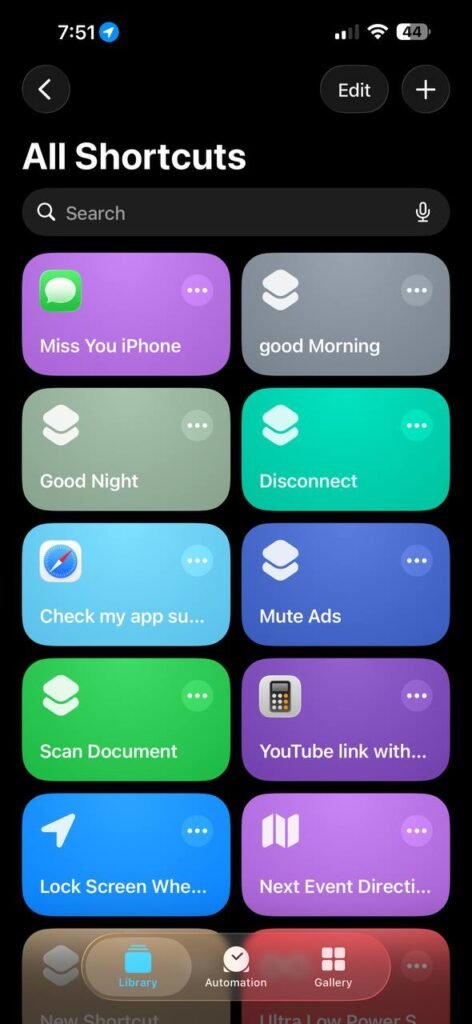
When your iPhone receives a specific message like miss you iphone from a trusted contact, it automatically performs multiple actions. It turns on Bluetooth, enables Wi-Fi, activates mobile data, switches on low power mode, increases volume, and fetches the current location. Then it sends that location back to the sender.
This is extremely useful if your phone is misplaced or not easily accessible. Instead of searching manually, you can trigger everything remotely.
How This Shortcut Works
This shortcut works using automation inside the Shortcuts app. The trigger is a message containing a specific keyword. Once that message is received, the iPhone executes a sequence of predefined actions instantly. The logic is simple. The message acts as a command, and the shortcut acts as a response system. This makes your iPhone behave intelligently without any manual input at that moment.
Step-by-Step Process to Create Miss You iPhone Shortcut
Step 1: Open Automation
Go to the Shortcuts app and switch to the Automation tab. Tap on create new automation.
Step 2: Select Message Trigger
Choose the message option as the trigger. Enter the phrase miss you iphone and select the sender contact for security.
Step 3: Add Required Actions
Now start adding actions one by one. Add Bluetooth On, Wi-Fi On, Mobile Data On, and Low Power Mode On.
Step 4: Adjust Volume and Location
Add an action to set media volume to 100 percent. Then add get current location.
Step 5: Send Location
Add a send message action and attach the current location to a selected contact.
Step 6: Disable Confirmation
Turn off the ask before running option so the automation runs instantly.
Step 7: Save and Test
Save the automation and test it by sending the trigger message.
iCloud Shortcut Link for Easy Access
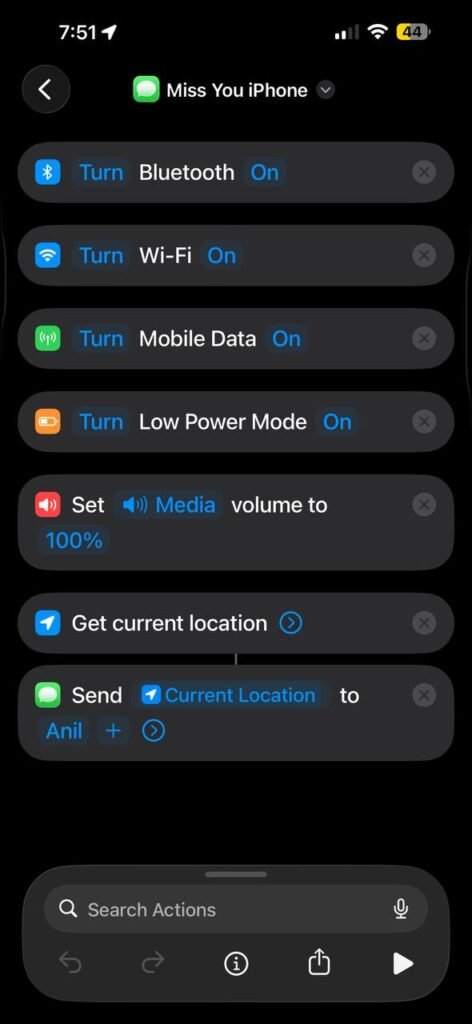
To make things easier, you can upload this shortcut to iCloud and share it with others. Naming it clearly as Miss You iPhone helps users understand its purpose quickly.
Users can import the shortcut and customize it based on their needs, such as changing the contact number or trigger message. This makes it easy to share with your audience or blog readers.
Additional Useful iPhone Shortcuts
Good Morning Shortcut
This shortcut helps you start your day smoothly. It can turn off Do Not Disturb, show weather updates, read your schedule, and open your favorite apps.
Good Night Shortcut
Before sleeping, this shortcut can enable Do Not Disturb, reduce brightness, turn on low power mode, and set alarms automatically.
Quick Share Shortcut
This shortcut allows you to instantly share files, text, or screenshots through your preferred apps without switching multiple screens.
Important Tips While Using Shortcuts
Shortcuts are powerful, but they should be used responsibly. Always use trusted contacts for automation triggers, especially when location or messages are involved.
Also, avoid creating unnecessary complex shortcuts. Focus on solving real problems instead of adding too many actions that you don’t actually use.
Conclusion
iPhone shortcuts are one of the most underrated features that can completely change how you use your device. They are not just about automation but about making your daily tasks easier and faster.
The Miss You iPhone shortcut is a great example of how smart automation can solve real problems like locating your device and activating essential settings instantly. Along with that, simple shortcuts like Good Morning and Good Night can improve your routine.
If you start using shortcuts properly, you’ll realize how much time you can save. Instead of repeating the same steps every day, you let your iPhone handle it for you. That’s where the real power of automation lies.




